
Hide Files and Folders provides you with several methods to protect and/or block access to your files and folders. The program installs a VxD driver that works at Windows Kernel level, so that the protection it offers is practically 100% unbreakable. You can select among five strong protection methods for your files and folders.
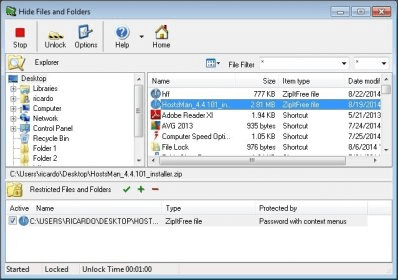
The program includes a built-in file system navigator that allows you to locate easily the file or folder you want to protect and add it to the protection list with a simple click. When you do so, you are prompted to select a protection method – "Hide", "Password with context menus", "Password with auto-popup", "Read only", and "Hide name only". Obviously, the "Hide" method hides the file/folder from your file system, while the "Password with context menus" and "Password with auto-popup" methods will require you to provide the program's master password to open the protected file/folder. The "Read only" method allows anybody to open the file/folder and see its contents, but a password is required to edit it. Finally, the "Hide name only" method hides the file/folder, but you can still access it by providing its full path.
Hide Files and Folders allows you to set a master password that serves both for running the program and for accessing your protected files/folders. However, you can also set an additional password to recover the main one, in case you forget it. Besides, you can also set the unlock time with second precision and when the time expires, unlocked or unprotected files will be automatically re-protected. The program integrates with the Windows Explorer context menu, so that you can also protect or unprotect your files and folders from there, without even running the program. Finally, it allows you to set hot-keys and magic-words to start the program and to lock and unlock your files and folders.
As you can see, Hide Files and Folders is a powerful tool that provides you with five effective methods to protect your files and folders from unauthorized access. If you are interested in hiding your files and folders, blocking access to them, preventing certain programs from being used, and even blocking access to Internet on your PC, I would definitely recommend you to give Hide Files and Folders a try.






Comments